Parking in a cramped downtown garage or backing a trailer down a narrow trail can turn even confident drivers into nervous wrecks. A panoramic view monitor solves this problem by giving you a real-time bird’s-eye view of your vehicle and everything around it. Also called a 360-degree or Around View Monitoring (AVM) system, this technology stitches together video feeds from multiple cameras to eliminate blind spots that traditional mirrors simply cannot cover. Understanding how a panoramic view monitor works helps you take full advantage of one of the most useful safety features in modern vehicles.
This guide walks you through the entire technology, from camera placement and image stitching to AI-powered warnings and calibration. You will learn how these systems differ from dashcams, what makes them essential for both consumer and commercial vehicles, and how to get the most out of the feature in any driving environment.
The Core Technology Behind 360-Degree Imaging
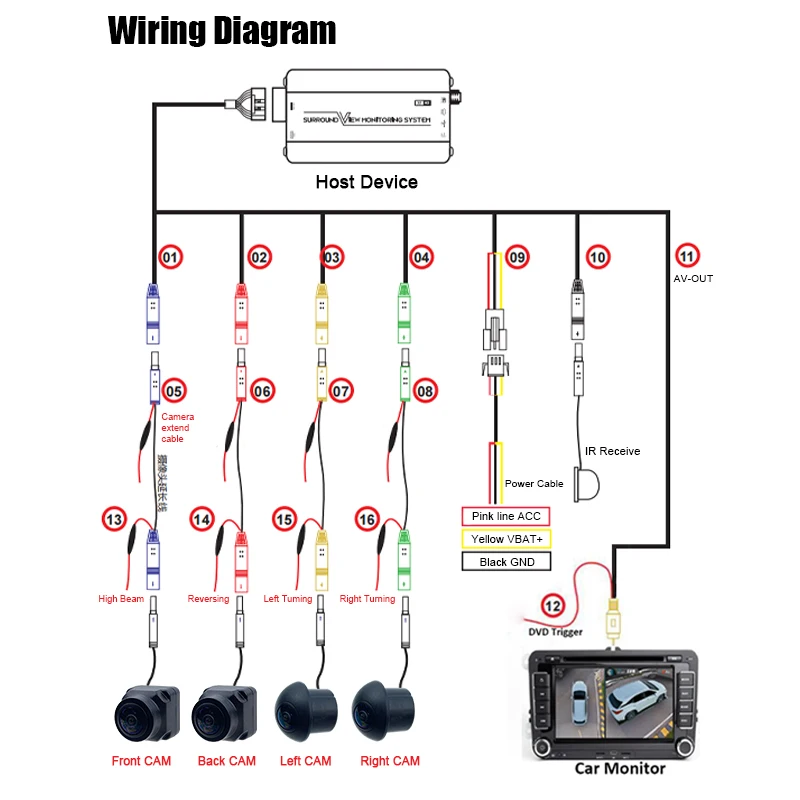
A panoramic view monitor creates a seamless overhead image by combining specialized hardware with intelligent software. Unlike a standard backup camera that shows only one angle, this system delivers full periphery coverage through four ultra-wide-angle cameras working together.
Four-Camera Fisheye Setup
Every panoramic system relies on four 1080P HD fisheye cameras mounted at strategic points around the vehicle:
– Front: Below the grille or near the front emblem
– Rear: Integrated into the license plate area
– Left and Right: Underneath or inside the side mirrors
Each fisheye lens captures approximately 180 degrees of vision, creating overlapping fields of view. These wide angles are essential because they allow each camera to see close to the vehicle’s edges, revealing curbs, pedestrians, and low obstacles that would otherwise stay hidden.
Image Stitching with the AVM Algorithm
Raw fisheye footage looks heavily distorted on its own, so the system depends on an integrated AVM (Around View Monitoring) algorithm to correct and blend the images. This software performs three critical tasks:
– Removes lens curvature
– Aligns overlapping areas between cameras
– Seamlessly merges all feeds into one cohesive top-down view
Modern systems process this in real time without an external control box, which reduces lag and simplifies installation. The result is a smooth, accurate bird’s-eye display that updates instantly as you move.
Real-Time Display and Low Latency
For a panoramic system to be safe, it must deliver low-latency video. Any delay between movement and screen update could cause you to misjudge distances and strike an obstacle. High-performance processors ensure the 1080P HD feed appears instantly on the dashboard screen, even during sharp turns or quick reverse maneuvers.
Activation and Driving Modes
The panoramic view monitor adapts to different scenarios through automatic triggers and manual controls, giving you flexibility when you need it most.
Automatic Reverse Activation
When you shift into reverse gear, the system instantly switches to rear-view mode. It highlights nearby objects and often overlays dynamic guidance lines that adjust with your steering input. This feature helps prevent collisions while backing up, especially in tight driveways or narrow parking spots.
Manual Low-Speed Activation
You can also activate the panoramic view manually at speeds under 10 mph. A button or touchscreen icon brings up the 360-degree view on demand, which is ideal for navigating:
– Narrow alleys
– Crowded city streets
– Off-road obstacles
This manual option is particularly helpful when parallel parking or approaching sharp turns where side visibility is limited.
2D and 3D Viewing Options
Most systems offer multiple display modes to suit your preference:
– 2D Bird’s-Eye View: A flat, map-like overhead image showing the car and surroundings
– 3D Perspective: A simulated three-dimensional view that mimics looking down from above, enhancing depth perception
Some advanced models even simulate a “Super Rearview Mirror” effect, extending the rear view across multiple lanes for safer highway lane changes.
Advanced Safety and AI Features
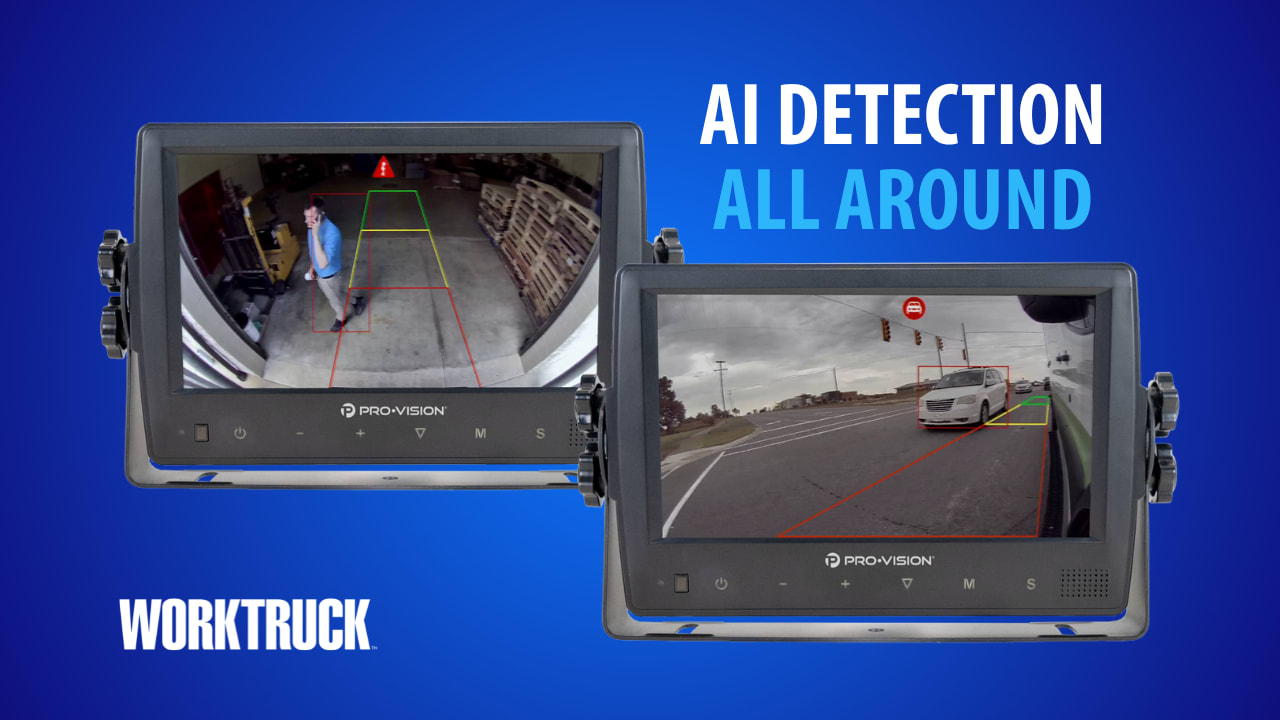
Beyond basic visibility, modern panoramic systems integrate smart technologies that warn you of potential dangers before they happen.
Built-In Front Collision Warning
Using only the front-facing camera and processing algorithms, the system monitors the distance and speed of vehicles ahead. If it detects a rapidly closing gap, it triggers visual and audible alerts. This helps you avoid rear-end collisions, especially in stop-and-go traffic.
No extra sensors or cameras are required. The FCW function runs entirely on existing video data, making it a cost-effective safety enhancement.
Radar and Sensor Fusion
In higher-end models, the panoramic view system integrates with radar or ultrasonic sensors. This sensor fusion delivers several advantages:
– Early detection of moving objects like crossing pedestrians
– Better distance judgment in poor visibility
– Cross-verification between visual and radar data
For example, if a child runs behind the vehicle, radar can detect the motion even if the camera view is partially blocked, triggering an alert you might otherwise miss.
AI-Powered Object Highlighting
Some systems use AI-driven analytics to identify and highlight specific hazards near your vehicle:
– Curbs and raised edges
– Large rocks or logs off-road
– Stationary vehicles in blind zones
These highlighted areas appear in contrasting colors like red or yellow on the screen, drawing your attention immediately to potential risks.
Calibration and Installation Process
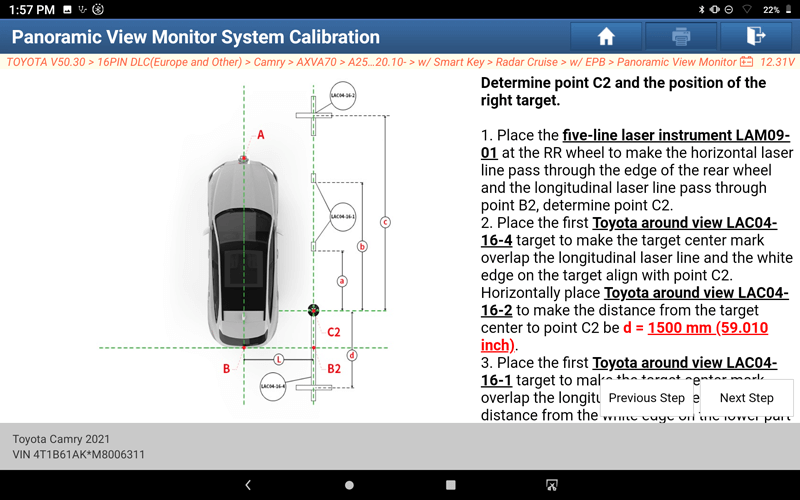
Even the best panoramic system fails without proper calibration. Misaligned cameras produce warped or disjointed images that defeat the entire purpose of the technology.
One-Minute Automatic Calibration
Newer systems feature automatic calibration that takes less than a minute to complete:
1. Place four calibration pads around the vehicle
2. Start the calibration mode through the display
3. Let the system detect pad positions and adjust image alignment
This process includes automatic plane correction, which compensates for uneven ground or slight camera misalignment during installation. It eliminates complex manual adjustments, saving time while ensuring accuracy.
No External Control Box Required
Unlike older systems that relied on bulky external processors, modern panoramic monitors integrate the AVM algorithm directly into the head unit or display module. This design offers several benefits:
– Fewer components to install
– Reduced wiring complexity
– Lower failure risk
– Faster startup and response times
This streamlined approach makes retrofitting easier and more reliable, especially for aftermarket installations.
Professional Installation Costs
While DIY kits exist, professional installation is recommended due to precision requirements.
| Component | Cost Range |
|---|---|
| System Hardware | $600 to $1,200 |
| Professional Labor | $300 to $500 |
Total investment typically falls between $900 and $1,700, depending on vehicle type and system features. Trucks, buses, and emergency vehicles often require specialized mounting but benefit the most from reduced blind spots.
Display Quality and Viewing Experience

The clarity and responsiveness of the display directly affect how useful the system feels during real driving situations.
HD IPS Touchscreen Displays
Most panoramic systems use HD IPS (In-Plane Switching) screens because they offer:
– Wide viewing angles for clear visibility from any seat
– High brightness that remains visible in direct sunlight
– Accurate color reproduction
Optional capacitive touchscreens allow intuitive interaction. You can tap to switch views, zoom in, or access settings without fumbling for physical buttons.
Performance in All Conditions
The system maintains reliable performance across various environments:
– Bright sunlight: Anti-glare coatings and high-nit brightness prevent washout
– Low light: Night vision enhancement improves visibility after dark
– Rain or fog: Water-repellent camera lenses and image processing reduce blur
Video remains stable even on bumpy roads, thanks to digital stabilization that minimizes shake from vehicle vibration.
How It Differs From Dashcams and Mirrors
Understanding what sets panoramic view monitors apart helps clarify their unique value in any vehicle.
Panoramic Monitor vs Traditional Mirrors
Traditional mirrors have inherent blind spots that cannot be eliminated by repositioning:
– Areas directly in front of the bumper
– Close to the sides near the doors
– Behind the rear bumper
A panoramic system fills these gaps with real-time visuals, showing everything within 3 to 6 feet of the vehicle. This range is critical for avoiding low obstacles or small children.
Panoramic Monitor vs Dashcams
| Feature | Dashcam | Panoramic Monitor |
|---|---|---|
| View Direction | Forward only | 360-degree |
| Purpose | Incident recording | Real-time driving aid |
| Output | Recorded video | Live stitched display |
| Use Case | Post-accident evidence | Active collision prevention |
While dashcams record events, panoramic systems help prevent them by giving you live situational awareness throughout your drive.
Use Cases Across Driving Environments
Panoramic view monitors excel in diverse scenarios, from busy city streets to rugged off-road adventures.
Urban Parking and Tight Spaces
In crowded areas like downtown garages or beachside parking lots, the top-down view lets you:
– Judge clearance from adjacent cars
– See curbs and wheel stops clearly
– Avoid scraping side mirrors
The system acts like a visual assistant, reducing stress and damage during parallel parking or tight turns.
Off-Road and Trail Navigation
For off-roaders tackling rocky trails, the Multi-Terrain Monitor function adjusts the camera angle to show:
– Rocks and ruts under the wheels
– Ground clearance in real time
– Approaching drop-offs or inclines
You can navigate challenging terrain confidently, minimizing undercarriage damage.
Commercial and Heavy-Duty Vehicles
Trucks, buses, and emergency vehicles have massive blind spots that create real danger. A panoramic system:
– Covers full side and rear zones
– Helps prevent side-swipe and rear-end collisions
– Integrates with MDVR (Mobile Digital Video Recorder) for fleet monitoring and liability protection
Fleet managers use recorded panoramic footage to review incidents and train drivers, improving overall safety across their operations.
Benefits and Safety Advantages
The advantages of panoramic view monitors go beyond convenience. They directly enhance safety and reduce risk on every drive.
Eliminates Blind Spots
The system reveals objects invisible in mirrors, including:
– Children near the bumper
– Low walls or poles
– Cyclists approaching from the side
This visibility is especially crucial at low speeds when you rely on quick visual checks.
Prevents Accidents and Damage
By providing a complete view, the monitor helps you avoid:
– Scrapes and dents in parking lots
– Collisions with stationary objects
– Rear-end impacts caused by poor depth perception
Vehicles equipped with 360-degree systems experience fewer low-speed collisions, which reduces repair costs and insurance claims over time.
Boosts Driver Confidence
New drivers, owners of large SUVs, or anyone uncomfortable with tight maneuvers benefit from the added visibility. The system reduces anxiety and improves precision, making every drive safer and more enjoyable.
Frequently Asked Questions About Panoramic View Monitors
What is the difference between AVM and a panoramic view monitor?
They refer to the same technology. AVM stands for Around View Monitoring, which is the technical term for a panoramic view monitor system. Both use multiple cameras to create a 360-degree bird’s-eye view of the vehicle.
How many cameras does a panoramic view monitor use?
A standard system uses four fisheye cameras mounted at the front, rear, left side, and right side of the vehicle. Each camera captures approximately 180 degrees of vision to ensure complete coverage.
Can a panoramic view monitor work at night?
Yes. Modern systems include night vision enhancement and low-light image processing that improve visibility after dark. High-brightness IPS displays also ensure the screen remains clear in all lighting conditions.
How long does calibration take?
Newer panoramic systems feature automatic calibration that completes in under one minute. You place four calibration pads around the vehicle, and the system adjusts image alignment on its own.
Is a panoramic view monitor the same as a dashcam?
No. A dashcam records forward-facing video for evidence after an incident, while a panoramic view monitor provides a real-time 360-degree display designed to prevent accidents. They serve different purposes and often complement each other.
How much does it cost to install a panoramic view monitor?
System hardware typically costs between $600 and $1,200, with professional labor adding another $300 to $500. Total installation usually falls between $900 and $1,700 depending on vehicle type and features.
Key Takeaways for Understanding Panoramic View Monitors
A panoramic view monitor works by combining four 1080P HD fisheye cameras, an integrated AVM algorithm, and real-time display technology to deliver a complete 360-degree perspective. From automatic reverse activation to AI-powered collision warnings, this technology represents a major leap forward in vehicle safety. Whether you navigate city streets, off-road trails, or manage a commercial fleet, knowing how a panoramic view monitor works empowers you to use it effectively and drive with greater confidence.
Your next step is simple: check whether your current vehicle supports a panoramic view monitor retrofit, or test the feature on your next test drive to experience the difference firsthand.