Is your new LG monitor stuck on its bulky base, preventing you from installing a sleek wall mount or ergonomic arm? Learning how to remove an LG monitor stand safely is the critical first step to upgrading your workspace without cracking the screen or breaking internal clips.
This guide details the exact tools and model-specific steps you need to detach stands from 22-inch curved displays up to large 29-inch panels. You will discover how to locate hidden screws, release spring-loaded pins, and troubleshoot stuck mechanisms so your monitor is ready for VESA mounting in minutes.
Essential Safety Steps Before Removing Your Stand
Rushing into stand removal without preparation often leads to scratched panels or electrical shorts. Proper setup protects both your equipment and your workspace from accidental damage.
Power Down and Disconnect Cables
Always unplug the power cord and all video cables like HDMI or DisplayPort before starting. This eliminates electrical hazards and prevents the screen from turning on while you handle the back panel.
Prepare a Soft Work Surface
Place the monitor face down on a thick towel, blanket, or foam pad. Never rest the screen on a hard desk or glass surface, as pressure points can crack the delicate display panel during the process.
Ensure a Stable Workspace
Verify that your table or floor is level and free of clutter. A shifting surface can cause the monitor to slide or tip over when you apply force to release the stand mechanism.
Required Tools for LG Monitor Stand Removal
Most LG models require minimal equipment, but having the correct tools ready prevents frustration and stripped screws. Gathering these items beforehand ensures a smooth disassembly process.
Essential Tool List
- Phillips screwdriver (#0 or #1): Needed for removing base screws and hinge fasteners.
- Small flathead screwdriver: Used to depress internal clips and pry off plastic caps.
- Plastic spudger or credit card: Safely lifts covers without scratching the monitor casing.
- Small container: Keeps tiny screws and caps organized so they do not get lost.
Pro Tip: Store your original stand, screws, and plastic caps in a labeled bag. You may need these specific parts for future transport or if you decide to resell the monitor.
Detaching Stands on Small LG Monitors (22″ and Under)

Smaller LG displays typically use a two-phase removal process involving a base screw and an internal locking clip. Follow these steps to avoid damaging the pivot mechanism.
Remove the Base Screw First
Flip the monitor face down on your padded surface. Locate the single screw at the bottom of the stand base and remove it using your Phillips screwdriver. Pull the base straight down to separate it from the stand arm.
Release the Internal Locking Pin
Turn the monitor upright so the screen faces you. Find the small clip hole near the pivot point on the back of the stand. Insert a flathead screwdriver into this hole and press down firmly to release the internal pin.
Slide the Stand Arm Off
While holding the screwdriver down to keep the pin depressed, gently pull the stand arm backward. It should slide out smoothly once the locking mechanism is fully disengaged.
Visual Cue: You will feel a slight pop when the pin releases. If the stand resists, check that your screwdriver is deep enough to fully depress the internal tab.
Steps for LG 22MK600M-BB Curved Monitor
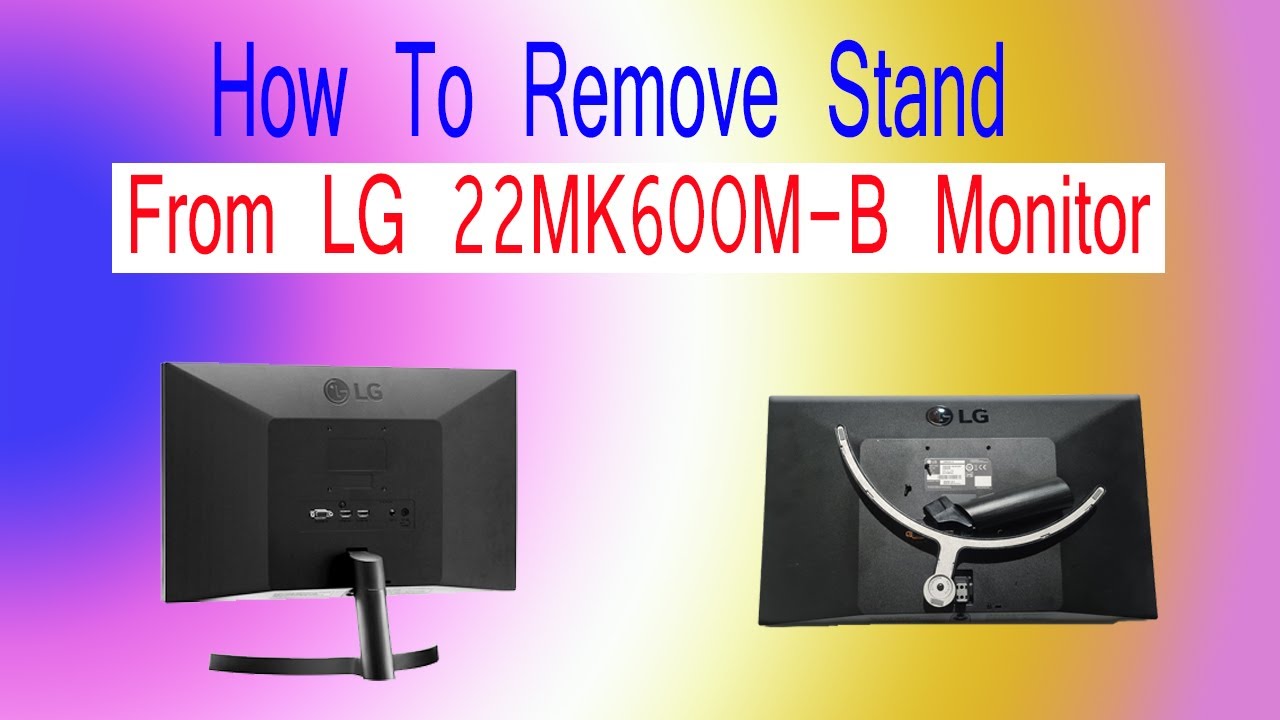
This specific curved model hides a critical securing screw under a removable plastic cap. Skipping the cap removal step can lead to broken hinges.
Lift the Base Assembly
With the monitor face down, gently lift the base straight up from the rear. The design allows it to detach easily, revealing the hinge assembly and the hidden cap underneath.
Pry Off the Plastic Cap
Locate the small plastic cover on the back of the hinge near the center. Use a plastic spudger or the edge of a credit card to carefully pry it off. Avoid metal tools here to prevent scratching the housing.
Unscrew and Remove the Hinge
Once the cap is removed, you will see a Phillips screw securing the hinge. Remove this screw completely. Afterward, pull the entire stand assembly straight back to detach it from the monitor body.
Warning: Never force the stand off before removing the hidden screw. Doing so risks snapping the hinge housing permanently.
Removing the Stand from LG 22M38A Models
The 22M38A utilizes a unique design with a two-screw base cover and an internal locking tab. Precision is key to releasing this mechanism.
Remove the Base Cover Screws
Flip the monitor face down. Locate the two Phillips screws at the bottom center holding the base cover in place. Remove both screws and lift the cover off to expose the locking tab.
Depress the Hidden Locking Tab
Look inside the exposed area to find a small black tab. Insert a small flathead screwdriver and press the tab downward firmly. While maintaining downward pressure, pull the stand outward to slide it free.
Reattach or Replace the Stand
If you are reinstalling the original stand, press the base handle back until it clicks. For VESA mounting, align your new bracket with the four screw holes and secure it with the provided hardware.
Common Mistake: Failing to press the tab all the way down. If the stand feels stuck, apply more downward pressure on the tab before pulling.
Procedure for Medium LG Monitors (27″ to 29″)
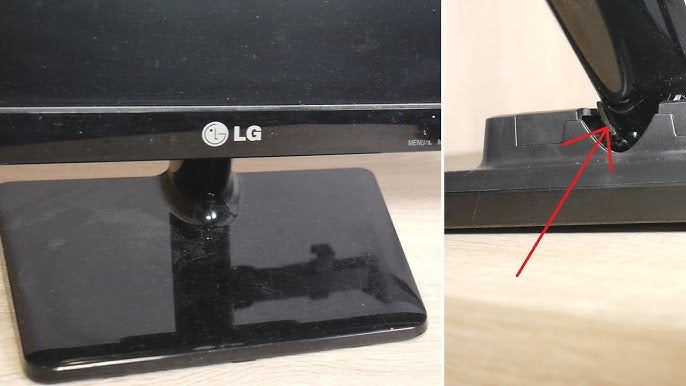
Larger LG monitors often hide mounting screws under a removable cover and rely on a friction-fit design. Patience is required to avoid cracking the plastic.
Pop Off the Top Cover
Locate the small plastic cover at the top of the stand mount on the back of the monitor. Pinch or lift it to remove it. Some models may require a gentle pry with a spudger to start.
Expose and Remove Mounting Screws
Gently wiggle the stand upward to fully reveal the mounting screws hidden underneath. Use your Phillips screwdriver to remove these screws completely and set them aside.
Wiggle and Pull the Stand
Grasp the stand firmly and pull straight up. If it feels tight, apply a gentle side-to-side wiggle while lifting. This motion helps disengage the friction fit without damaging the mount points.
Time Estimate: This process usually takes 3 to 5 minutes. Do not use excessive force, as patience prevents cracks in the casing.
Quick-Release Mechanism on Newer LG Models
Recent LG monitors feature a tool-free lock lever designed for rapid removal. This method requires no screwdrivers for the actual detachment.
Position Monitor Face Down
Place the monitor on your soft, padded surface with the screen facing down. Locate the lock lever on the back, situated near where the stand connects to the monitor.
Slide the Lock Lever Down
Use your finger or a flat tool to slide the lever downward. You should hear a soft click indicating the internal lock has disengaged.
Lift the Stand Straight Up
Pull the stand vertically upward. It should slide out of the groove smoothly without any resistance. No screws or tools are needed for this specific design.
Benefit: This design is ideal for users who frequently reconfigure their desk setup or swap between dual monitors.
Universal Method for Spring-Loaded Pins (Flatron 234)

Many older LG flat panels, including the Flatron 234 series, use a spring-loaded pin system. This method requires precise tool placement.
Remove the Base Screw
Turn the monitor over and locate the small screw at the base of the stand. Use a flathead or Phillips screwdriver to remove it completely.
Insert Tool into the Gap
Inspect the bottom of the stand arm near the pivot point to find a narrow gap. Insert a thin flathead screwdriver into this gap and push inward to retract the locking pin.
Pull the Stand Away
While holding the pin retracted with your tool, pull the stand arm straight back. The stand should release easily once the pin is fully depressed.
Expert Note: If the pin feels stuck, clean the gap with compressed air. Dust and debris can jam the spring mechanism over time.
Troubleshooting Stuck or Resistant Stands
Even when following the correct steps, some stands may resist removal due to tight tolerances or debris. Use these techniques to resolve common issues safely.
Address Stuck Stands Safely
Do not use excessive force if the stand will not budge. Instead, recheck for hidden screws, apply a gentle wiggle while pulling, or ensure your tool is fully depressing the internal clip.
Fix Stripped Screw Heads
If a screw head is stripped, place a rubber band between the screwdriver and the screw to add grip. Alternatively, try a precision magnetic bit to prevent slipping.
Loosen Stubborn Plastic Caps
If a plastic cap will not come off, warm it slightly with a hairdryer on low heat for 10 seconds. The slight expansion makes removal easier without breaking the plastic.
Benefits of Removing Your LG Monitor Stand
Removing the factory stand unlocks significant ergonomic and aesthetic improvements for your workspace. Understanding these benefits helps justify the effort of disassembly.
Enable VESA Mounting
Detaching the stock stand is mandatory for using VESA wall mounts or desk arms. The standard pattern is 100x100mm, allowing for flexible positioning.
Improve Desk Aesthetics
Eliminating the bulky “pirate leg” base creates a minimalist, modern look. This change instantly upgrades the visual appeal of your home office or gaming setup.
Enhance Cable Management
Without the base obstructing the back, you can route cables neatly behind the monitor. This reduces clutter and makes cleaning your desk much easier.
Save Valuable Desk Space
Switching to a monitor arm frees up surface area for other peripherals. This is especially useful for dual-screen setups or compact workspaces.
Reversibility and Warranty Considerations
Knowing that the process is reversible provides peace of mind. Proper handling ensures you maintain your warranty coverage throughout the modification.
Retain All Original Parts
Store all screws, caps, and the stand itself securely. You will need these components if you ever need to return the monitor to its original configuration or transport it safely.
Avoid Internal Damage
While most LG stands connect mechanically, some models route cables through the neck. Never yank the stand; always pull straight and evenly to avoid straining internal connectors.
Protect Your Warranty
Stand removal is a user-intended function and does not void your warranty if done correctly. However, damage caused by dropping the unit or scratching the screen during removal is not covered.
Frequently Asked Questions About Removing LG Monitor Stands
Do I need special tools to remove an LG monitor stand?
Most models only require a standard Phillips screwdriver and a small flathead screwdriver. Newer quick-release models may not need any tools at all.
Will removing the stand void my LG warranty?
No, removing the stand to install a VESA mount is a standard user function. However, accidental damage to the screen or casing during the process is not covered.
What if my LG monitor stand is stuck and won’t come off?
Do not force it. Check for hidden screws or caps you may have missed, and try gently wiggling the stand while applying steady pressure to release friction fits.
Can I reattach the original stand later if I need to?
Yes, the process is fully reversible. As long as you keep all screws, caps, and the stand itself, you can reinstall it at any time.
Are all LG monitors VESA compatible after removing the stand?
Most modern LG monitors are VESA compatible, but you should verify your specific model’s specifications. Look for four threaded holes on the back panel after stand removal.
Key Takeaways for Removing Your LG Monitor Stand
Successfully learning how to remove an LG monitor stand requires identifying your specific model type and using the correct release method. Whether you are dealing with a hidden screw on a curved 22-inch model or a quick-release lever on a newer display, patience and the right tools prevent costly damage.
Always work on a padded surface, disconnect all power sources, and store your original parts safely. By following these tailored steps, you can quickly transition your monitor to a VESA mount and enjoy a cleaner, more ergonomic workspace today.