A cracked monitor screen often feels like a sudden disaster for your workspace or gaming setup. You might stare at the black splotches and wonder if there is any way to save your display without spending a fortune on a new unit.
The hard truth is that you cannot fill a physical crack with glue or tape to restore the image. This guide explains why surface fixes fail and details the only three real options: replacing the internal panel, converting old backlights, or buying a new monitor.
Verify Physical Damage Before Panicking
Many users mistake software glitches or cable failures for permanent hardware damage. You must confirm the issue is a physical break in the glass or internal layers before declaring the unit dead.
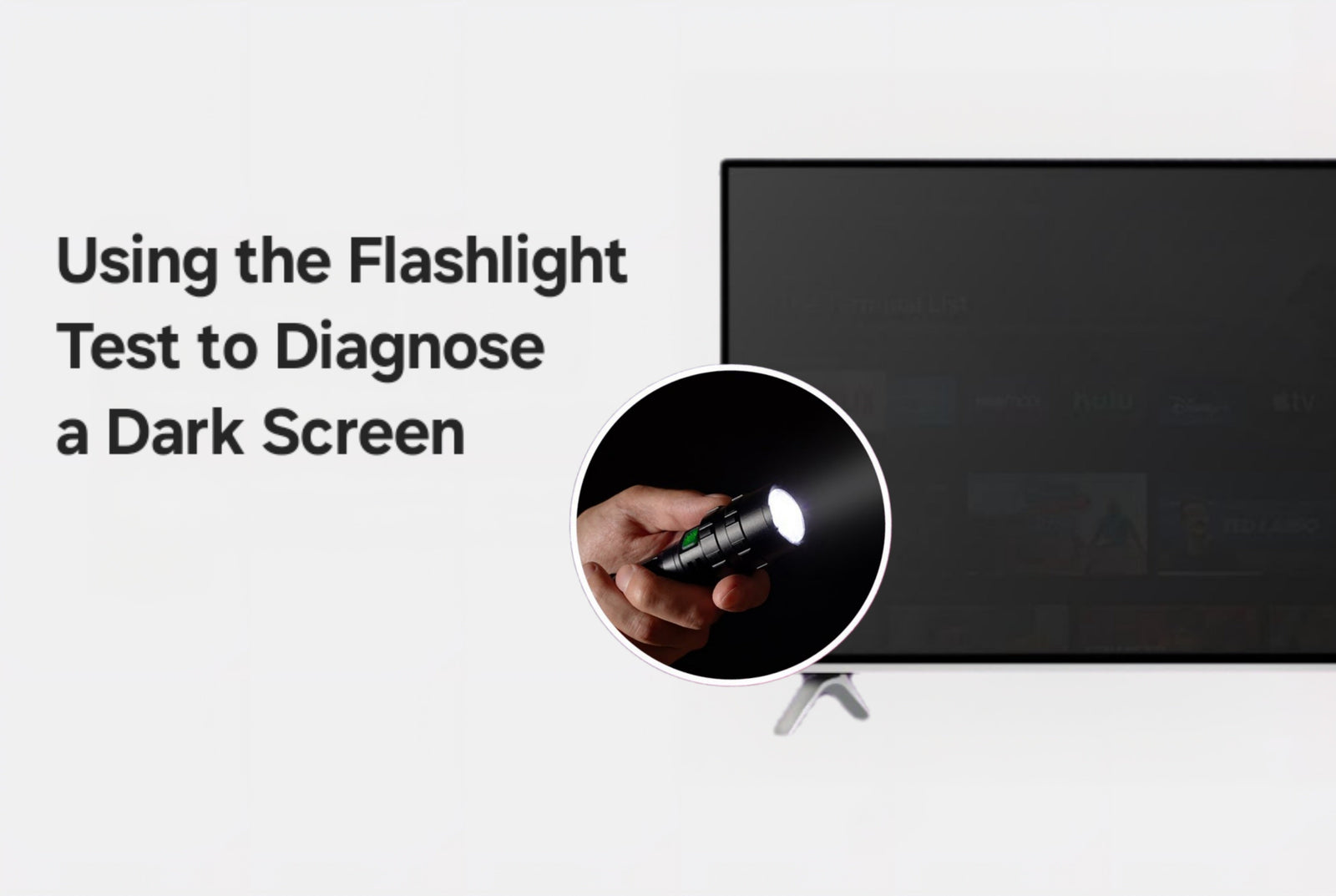
Perform the Flashlight Test
Shine a bright flashlight directly against the screen while the monitor is powered on.
- Faint image visible: Your LCD panel works, but the backlight has failed. This is repairable.
- No image or broken image: The panel itself is damaged. This indicates a cracked screen that needs replacement.
Connect to an External Display
Plug your computer into a different monitor or television. If the external display shows a perfect image, the problem lies strictly with your original screen. If the same visual artifacts appear on the second screen, your graphics card or drivers are likely at fault.
Boot Your Computer in Safe Mode
Restart your system in Safe Mode to load basic drivers. If the lines or flickering disappear, the issue is software-related. If the distortion remains visible, you are likely dealing with hardware damage.
Identify Specific Symptoms of a Broken Panel

Not every visual glitch means your screen is shattered. Distinguishing between a true crack and other issues saves you from unnecessary repairs.
Signs of a True Cracked Panel
Look for these definitive indicators of physical trauma:
- Visible spiderweb fractures or impact points on the glass surface
- Expanding black splotches where liquid crystals have leaked
- Color bleeding radiating from a specific spot
- Swollen or bulging sections of the display
- Unresponsive touch zones on touchscreen models
Common Issues That Mimic Cracks
| Symptom | Likely Cause | Potential Fix |
|---|---|---|
| Black screen with faint image | Backlight failure | LED retrofit or inverter swap |
| Flickering or no signal | Loose cable or bad port | Reseat cables or replace HDMI |
| Horizontal or vertical lines | GPU issue or driver crash | Update drivers or test GPU |
| Blurry or stretched image | Wrong resolution setting | Set to native resolution |
Avoid These Dangerous and Fake Fixes
Internet hacks often suggest using household items to “heal” a screen. These methods do not work on LCD or LED technology and can cause permanent harm.
Do Not Use Glue or Resin
Filling a crack with epoxy or super glue creates visual distortion and does nothing to restore the liquid crystal function. The adhesive can seep into internal layers and ruin the panel completely.
Do Not Apply Tape or Stickers
Placing clear tape over a crack might hide the damage temporarily, but it adds glare and traps dust. It also fails to stop the crack from spreading under thermal stress.
Do Not Press or Heat the Display
Applying pressure or heat risks spreading the fracture further. You might melt internal components or cause permanent short circuits in the delicate electronics.
Replace the Display Panel Yourself
If you have technical skills, swapping the internal LCD or LED panel is the only genuine way to fix a cracked screen. This process requires patience and precision.
Locate Your Exact Panel Model
Use tools like PanelLook or search your monitor model number online to find the specific panel part number. Compatibility depends on size, resolution, interface type, and mounting hole alignment.
Source a Compatible Replacement
Check marketplaces like AliExpress, eBay, or specialized LCD suppliers for your part number.
- Easier to find: Panels for Acer, ASUS, and LG models.
- Harder to find: Panels for Samsung and Alienware units.
Ensure the replacement matches the interface (eDP or LVDS) and physical connector positions exactly.
Analyze Cost Versus Buying New
Calculate if the repair is worth the effort. For example, a broken high-end gaming monitor might cost $120 used, with a replacement panel at $300. If a new unit costs $600, you save roughly $180 plus labor.
Rule of thumb: If the panel costs more than 80% of a new monitor, just buy a new one.
Gather Necessary Tools
You will need specific tools to avoid damaging the device:
- Plastic pry tools or spudgers
- Precision screwdrivers (Phillips #0 and #1)
- Non-conductive work surface
- Anti-static wrist strap
Never use metal tools inside the case as they can scratch circuits or cause shorts.
Step-by-Step Replacement Procedure
- Power off and unplug the monitor, then wait five minutes for capacitors to discharge.
- Use a spudger to carefully remove the back cover by working around the edges.
- Unscrew the metal frame that secures the display panel.
- Disconnect the ribbon cables for data and backlight power gently.
- Lift out the old panel by holding only the edges to avoid breakage.
- Compare the new panel to ensure mounts and connectors align perfectly.
- Slide in the new panel, reconnect cables securely, and screw the frame back.
- Reassemble the case and test the image before tightening all screws.
Test and Calibrate Your New Screen
Power on the unit and verify the image output immediately. Check that the resolution and refresh rate match the native specs. Run dead pixel tests using solid color backgrounds to ensure no defects exist.
Convert Backlights on Older LCD Monitors
This solution applies only if your screen is dark but shows an image under a flashlight. It fixes backlight failure, not cracked panels.
Why Convert CCFL to LED?
Older monitors use CCFL tubes that dim and fail over time. Converting to LED strips reduces power use and increases lifespan significantly.
| Feature | CCFL Original | LED Conversion |
|---|---|---|
| Power Use | 15–30 Watts | 5–10 Watts |
| Brightness | Dims with age | Consistent output |
| Lifespan | ~10,000 hours | 50,000+ hours |
| Cost | $100+ | Under $25 |
Required Components for Conversion
You need a 12V LED strip, a 12V DC power source, and a 5V relay module to sync the lights with the monitor power. You will also need basic wiring and soldering equipment.
Wiring the LED Strip
- Remove the fragile CCFL tubes while wearing gloves.
- Install LED strips along the top, bottom, and sides for even lighting.
- Tap into a 12V test point on the board or use an external adapter.
- Connect a relay to switch the 12V power when the monitor turns on.
- Secure all wires and reassemble the case carefully.
Decide When to Replace the Monitor Entirely
For most people, buying a new monitor is the safest and most efficient choice.
Situations Requiring Replacement
- The cracked panel has no available replacement parts.
- DIY repair costs exceed 80% of a new unit price.
- You lack the tools or confidence for delicate electronics work.
- The monitor is older than three to five years.
- Your warranty or insurance covers accidental damage.
When Repair Makes Sense
Consider repair only if you own a high-end professional monitor, have electronics experience, and can source an affordable panel. This path is also viable for those prioritizing e-waste reduction.
Utilize Professional Repair Services
Specialized shops can diagnose issues, though they rarely fix cracked panels due to cost.
What to Expect from Pros
Services like uBreakiFix often offer free diagnostics and same-day service for simple faults. However, they typically recommend replacement for cracked screens because parts are expensive.
Check Warranty and Insurance Coverage
Standard warranties do not cover drops or cracks. However, accidental damage protection plans or home insurance policies might cover the replacement cost. Contact your provider with photos and proof of purchase to check eligibility.
Understand Safety Risks of DIY Repair
Opening a monitor involves significant hazards that casual users should not ignore.
Electrical Hazards
Monitors store high voltage in capacitors even when unplugged. CCFL inverters can operate at lethal voltages up to 1,000V. Always unplug the device and wait at least ten minutes before opening.
Physical Dangers
Broken glass can cause serious cuts. LCD panels also contain hazardous materials. Wear gloves and safety glasses during any disassembly.
Risk of Total Failure
Damaging a ribbon cable or mainboard during repair can kill the entire monitor. Improper reassembly may lead to short circuits. Note that opening the case voids most manufacturer warranties.
Troubleshoot Non-Crack Display Issues
If your screen is intact but malfunctioning, try this checklist before assuming hardware failure:
- Power cycle both monitor and PC by unplugging for 30 seconds.
- Reseat HDMI or DisplayPort cables at both ends.
- Try a different cable or port on your graphics card.
- Test the computer with another monitor.
- Update your GPU drivers to the latest version.
- Set the display to its native resolution and refresh rate.
- Boot in Safe Mode to rule out software conflicts.
Frequently Asked Questions About Cracked Monitor Screens
Can I fix a cracked monitor screen with super glue?
No, super glue cannot repair the internal liquid crystal layer. It creates visual distortion and may seep inside to cause further damage.
How do I know if my screen is cracked or just the backlight?
Shine a flashlight on the screen. If you see a faint image, the backlight is dead. If the image is broken or black spots appear, the panel is cracked.
Is it worth replacing a cracked laptop or monitor screen?
It depends on the cost. If the replacement panel costs less than 70% of a new unit and you have technical skills, it is worth it. Otherwise, replacement is better.
Why are there black spots on my monitor screen?
Black spots usually indicate physical damage where liquid crystals have leaked or the internal layers have separated due to impact.
Does warranty cover a cracked screen?
Standard warranties cover manufacturing defects, not physical damage like cracks or drops. You need accidental damage protection for coverage.
Can pressure lines on a monitor go away?
Minor pressure lines might fade over time, but severe pressure damage causing black spots or permanent lines indicates broken internal structures that will not heal.
Key Takeaways for Fixing Your Cracked Monitor Screen

A cracked monitor screen represents permanent physical damage that software cannot fix. Your only real options are replacing the internal panel, converting an old backlight if the panel is intact, or buying a new monitor.
Most users should choose replacement because it is safer, faster, and often more cost-effective than sourcing rare parts. Only attempt a DIY panel swap if you have advanced technical skills and access to affordable components.
Always prioritize safety by disconnecting power and wearing protection when handling broken glass or internal electronics. If you are unsure, consult a professional or invest in a new display to ensure reliable performance.