A cracked screen or shattered panel is one of the most expensive mistakes you can make during a move. Monitors are fragile, heavy, and full of sensitive electronics that punish poor preparation. Learning how to pack a monitor the right way protects your investment whether you are relocating down the street or shipping a display across the country.
Most monitor damage happens before the vehicle even starts moving. Wrong materials, skipped disassembly, or loosely sealed boxes turn a routine move into a costly repair. This guide breaks down the exact methods professionals use, from original-box packing to double-box systems, plus how to handle curved screens, AIO units, cables, and common errors that ruin good intentions.
Use the Original Box When Available
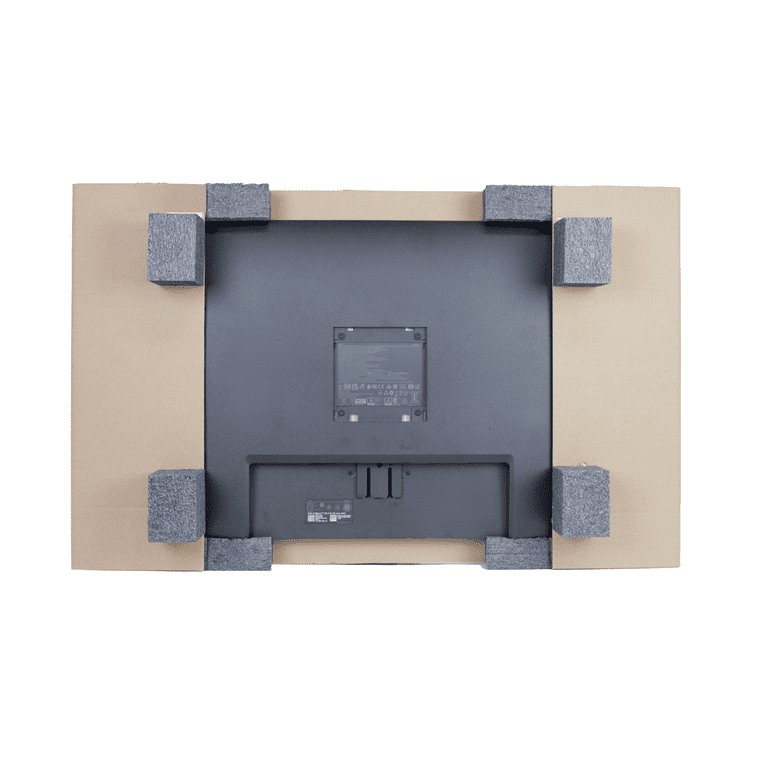
If you still have the manufacturer’s packaging, packing a monitor becomes dramatically safer. Original boxes are engineered with custom foam inserts that cradle the screen and absorb shocks, cutting damage risk by roughly 90% compared to improvised solutions.
Remove the Stand Before Packing
Never ship a monitor with the stand attached. The base acts as a lever that can snap the plastic VESA mount or hinge during sudden stops. Use a Phillips screwdriver or Allen key to detach the stand, then store screws in a labeled bag taped to the back of the monitor.
Wrap the Screen With a Microfiber Cloth
Wipe the screen clean first, then lay a soft microfiber cloth directly over the glass. This prevents micro-scratches caused by direct contact between the display and the styrofoam, especially on glossy or anti-glare coated panels.
Reassemble With Custom Foam Inserts
Slide the monitor between the pre-molded foam blocks until it clicks securely into place. Make sure no part of the screen or bezel feels pressed or bent. Place cables, power bricks, and the detached stand into the designated foam cutouts without forcing them.
Seal the Box With the H-Tape Method
Once everything sits inside the outer cardboard shell, seal both top and bottom flaps using the H-Tape method:
- Tape the main center seam.
- Run tape along both parallel edges of the box.
This creates an “H” pattern that reinforces structural integrity and prevents bursting under pressure. Label all sides with “FRAGILE,” “THIS SIDE UP,” and “GLASS SCREEN INSIDE” using a red permanent marker.
No Original Box? Use the Double-Box Method

If the original packaging is gone, the double-box method is your strongest defense. This technique creates a 3-inch crush zone around the monitor, mimicking professional shipping standards.
Measure Monitor Dimensions First
Measure the monitor’s width, height, and depth. Use those numbers to select two boxes:
- Inner box: Snug fit for the wrapped monitor, with no more than 1 to 2 inches of extra space.
- Outer box: At least 6 inches larger on all sides to allow padding.
For a 24-inch monitor, an inner box around 26″x26″x6″ paired with an outer box near 30″x30″x10″ works well. For a 32-inch monitor, try an inner box near 34″x20″x8″ with an outer box around 40″x26″x14″.
Apply a Screen-Protecting Cardboard Shield
Cut a piece of thick corrugated cardboard to match the screen size. Tape it securely over the front of the display using painter’s tape or low-adhesion tape to avoid residue. This prevents punctures from shifting contents during transit.
Wrap the Monitor in Anti-Static Bubble Wrap
Standard bubble wrap generates static electricity that can fry internal circuitry. Always use anti-static bubble wrap, usually pink or silver. Wrap the entire monitor in at least three layers, focusing extra material on corners and edges.
Secure with tape, but never let tape touch the screen or bezel. Then apply foam corner protectors, since over 30% of screen cracks originate from corner impacts.
Pack Into the Inner Box With Cushioning
Place the wrapped monitor in the inner box. Fill any gaps with crumpled Kraft paper, packing peanuts, or air pillows to prevent movement. Seal the inner box with strong packing tape.
Build a Crush Zone in the Outer Box
Fill the bottom of the outer box with 3 inches of soft cushioning. Center the sealed inner box inside, then add padding on all sides and the top. The inner box must float in the center, suspended by padding and touching none of the outer walls.
Pass the Shake Test
Seal the outer box and gently shake it. If you hear or feel movement, reopen and add more cushioning. Any shifting means direct force transfer on impact, which is a leading cause of screen breakage.
Once stable, apply the H-Tape seal and label all six sides with “FRAGILE – GLASS SCREEN INSIDE,” “THIS SIDE UP” with arrows, and “DO NOT STACK.”
Handle Curved and AIO Monitors Differently
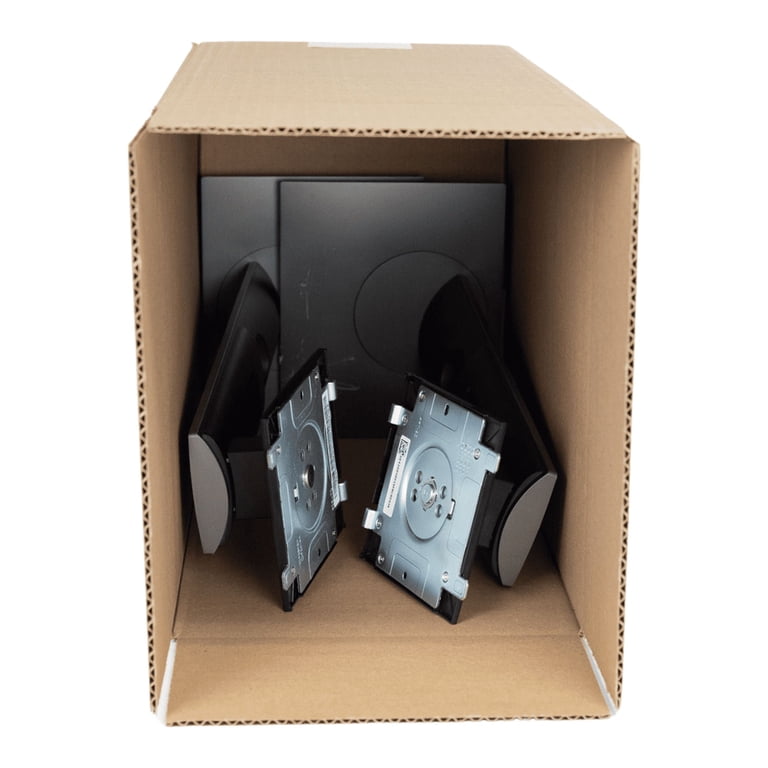
Standard packing methods do not always work for specialty displays. Curved and All-In-One models need extra attention because of their shape and weight distribution.
Pack Curved Monitors Upright in a Laydown Box
Curved screens are prone to flexing and edge stress. Use a laydown wardrobe box or a tall electronics box with vertical clearance. Never force a curved monitor into a shallow container.
Place the monitor screen-side up, supported evenly along the curve. Pad both the convex front and concave back with extra foam or rolled towels. Transport only in an upright position to prevent panel warping.
Secure Heavy AIO Units With Extra Support
All-In-One PCs combine the monitor and computer into one unit, making them heavier and more fragile. Follow double-box protocol, but use a double-walled or triple-walled cardboard box rated for 60+ lbs. Reinforce bottom flaps with cross-tape or plywood inserts and always remove the stand, since its weight increases leverage and hinge failure risk.
Due to weight, never place an AIO monitor on its side during transport. Keep it fully upright at all times.
Protect Cables and Accessories Properly
Loose cables can scratch the screen or puncture the bezel if packed carelessly. Treating them as carefully as the monitor itself prevents secondary damage.
Photograph Cable Connections First
Before disconnecting anything, take a photo of all plugged-in cables: HDMI, DisplayPort, USB, power, and audio. This saves time when reconnecting later.
Bundle Cables With Velcro Ties
Coil each cable neatly and secure with Velcro straps rather than twist ties, which can cut insulation. Place all cables in a sealed plastic bag labeled “Monitor Cables.” Attach the bag to the monitor box or slip it into a side pocket. Never tape cables directly to the screen.
Store the Stand in an Accessory Compartment
If using the original box, place the stand in the designated foam cutout. Otherwise, wrap it in bubble wrap and pack it in a separate small box or at the top of the outer box, never where it presses against the monitor.
Load and Transport With Care
Even perfect packing fails if loading and transport are handled poorly. How you place the box in your vehicle matters as much as how it is sealed.
Keep the Box Upright at All Times
Always transport the monitor upright, matching the “THIS SIDE UP” label. Laying the box flat exposes the screen to vibrations from vehicle axles, a major cause of internal panel damage on long drives.
Place in the Car Floorboard or a Secured Seat
For personal vehicles, the best spot is the floorboard behind the passenger seat. Slide the seat forward to wedge the box upright. Alternatively, secure the box tightly on the passenger seat with a seatbelt. Never place it in the trunk where it can slide and crash into walls.
Load Last and Unload First in a Moving Truck
In a rental truck, load monitors last so they sit near the front door. Wedge the box upright between soft, heavy items like mattresses or couches. Never stack anything on top, and avoid placing the box near doors or walls where shifting cargo can hit it.
Avoid Common Packing Mistakes
Even experienced movers make errors that compromise monitor safety. Knowing what not to do is just as important as following the right steps.
Using Towels Instead of Bubble Wrap
Towels protect against scratches but offer zero shock absorption. A fall from waist height will shatter a towel-wrapped screen. Always use anti-static bubble wrap for impact protection.
Shipping With the Stand Attached
The stand’s base acts as a lever. During sudden stops, this force can snap the plastic hinge or VESA mount. Always remove the stand before packing.
Overstuffing the Box
Forcing cables or accessories into tight spaces creates pressure points. Under vibration, this pressure can crack the back panel or damage internal components. Leave room and pack extras separately.
Skipping the Shake Test
If the inner box moves inside the outer box, energy transfers directly to the monitor on impact. Always perform the shake test, and if anything shifts, add more padding.
Ship With Insurance and Proper Labels
If you are mailing the monitor, carrier handling is unpredictable. Extra precautions are non-negotiable.
Declare Contents and Buy Insurance
When shipping via UPS, FedEx, or USPS, always declare the contents as “Fragile – Computer Monitor” and purchase full-value shipping insurance. Carrier liability without declared value is often capped at a nominal amount per pound, far below replacement cost.
Follow Lithium Battery Rules for Portable Monitors
Shipping a portable monitor with a built-in lithium-ion battery requires extra steps:
- Charge to 30% maximum, since higher charge increases fire risk.
- Confirm carrier regulations, as most allow one battery per package.
- Mark the box as “Lithium Battery Inside” if required.
Frequently Asked Questions About How to Pack a Monitor
What is the best material to wrap a monitor for moving?
Anti-static bubble wrap is the best material because it cushions against impact while preventing static electricity damage to internal components. Standard bubble wrap generates static that can destroy circuits even when the screen looks fine.
Can I pack a monitor without the original box?
Yes. The double-box method works extremely well. Wrap the monitor in anti-static bubble wrap with foam corner protectors, place it in a snug inner box, then suspend that box inside a larger outer box with at least 3 inches of cushioning on all sides.
Should I remove the monitor stand before packing?
Always remove the stand. The base creates leverage that can snap the plastic VESA mount or hinge during sudden stops or impacts. Store screws in a labeled bag and pack the stand separately or in a designated foam cutout.
How should I transport a monitor in a car?
Keep the box upright and place it in the floorboard behind the passenger seat, wedged in place by sliding the seat forward. The passenger seat secured with a seatbelt is a secondary option. Never place the monitor in the trunk where it can slide and crash into walls.
Is it safe to ship a monitor with a lithium battery?
Yes, but follow carrier rules. Charge the battery to no more than 30%, confirm the carrier’s lithium battery policy (most allow one per package), and label the box as containing a lithium battery if required.
How do I pack a curved monitor without damaging it?
Use a laydown wardrobe box or a tall electronics box with enough vertical clearance to support the curve. Place the monitor screen-side up, pad both the convex and concave sides evenly, and transport only in an upright position to prevent panel warping.
Key Takeaways for Packing a Monitor Safely

Knowing how to pack a monitor comes down to three essentials: preparation, materials, and method. Use the original box whenever possible, since it cuts damage risk by roughly 90%. If that box is gone, build a double-box system with anti-static wrap, foam corner protectors, and a solid 3-inch crush zone. Always transport the box upright, label every side clearly, and insure any shipment for full replacement value. Avoid common pitfalls like leaving the stand on, using regular bubble wrap, or skipping the shake test. With these steps in place, your monitor will arrive ready to power on like nothing happened.