A dirty screen ruins your viewing experience with distracting smudges and dull colors. You might be tempted to grab a paper towel or glass cleaner, but these common items can permanently scratch your display or strip away protective coatings.
This guide teaches you exactly how to clean flat screen TV monitor surfaces safely using distilled water and microfiber cloths. You will learn the correct steps to remove dust, fingerprints, and grease without risking electrical damage or leaving streaks behind.
Power Down and Unplug Your TV Before Cleaning
Safety is your first priority before you touch the screen to avoid electrical shock or accidental damage. A black screen also makes it much easier to see dust particles and oily smudges that need removal.
Turn Off and Disconnect Power
Always switch your television off completely and unplug it from the wall outlet. This ensures no electrical current runs through the device while you handle it. It also prevents the screen from heating up during the cleaning process.
Let the Screen Cool Down
Wait about 15 minutes if your TV has been on for a long time. Heat causes cleaning moisture to evaporate too quickly, which often leaves unwanted streaks on the display.
Secure the Unit Properly
Hold the top of the TV steady with one hand while you wipe with the other. Large screens can tip forward easily if you apply too much pressure on a stand.
Gather Safe Cleaning Tools for Your Display

Using the wrong materials is the fastest way to ruin your screen with micro-scratches or chemical damage. You only need a few specific items to do the job effectively and safely.
Select the Right Microfiber Cloth
Choose a soft, lint-free cloth made specifically for lenses or delicate electronics. These cloths trap dust particles without scratching the surface or creating static electricity.
Pro Tip: Keep two cloths ready, one slightly damp for cleaning and one completely dry for buffing.
Use Only Distilled Water
Fill a spray bottle with distilled or deionized water instead of tap water. Tap water contains minerals like calcium that leave white spots and can etch the screen over time.
Avoid Harmful Household Products
Never use the following items on your screen:
* Ammonia-based glass cleaners like Windex
* Alcohol or acetone solvents
* Paper towels or facial tissues
These substances strip anti-reflective coatings and create tiny scratches that dull your picture quality.
Remove Dust with Dry Wiping Techniques
Start every cleaning session with a dry wipe because most screens only need dust removal. This method requires no liquids and minimizes any risk of moisture damage.
Wipe Gently from Top to Bottom
Use long, sweeping motions with your dry microfiber cloth to lift dust away. Apply zero pressure and let the fabric do the work to protect sensitive pixels.
Check for Hidden Smudges
Shine a flashlight across the screen at an angle to reveal invisible dust or grease. This trick helps you spot areas that need extra attention before you stop cleaning.
Clean the Frame and Vents
Wipe down the bezel and ventilation holes using the same dry cloth. Clear vents are essential for preventing overheating and keeping your TV running efficiently.
Stop here if the screen looks clear, as you may not need to use any moisture at all.
Apply Damp Cleaning for Fingerprints
Move to damp cleaning only if dry wiping fails to remove oily fingerprints or stubborn marks. This step requires careful application of moisture to avoid liquid damage.
Mist the Cloth Not the Screen
Spray a small amount of distilled water onto your microfiber cloth until it is barely damp. Never spray liquid directly onto the screen, as it can seep into internal components.
Wipe in Small Sections
Work on small areas about six inches wide using light circular motions. Focus only on the smudged spots and avoid scrubbing hard against the panel.
Buff Immediately to Prevent Streaks
Use your second dry cloth to wipe the area right after cleaning it. This removes all remaining moisture and ensures a streak-free finish on your display.
Deep Clean Stubborn Grease and Grime
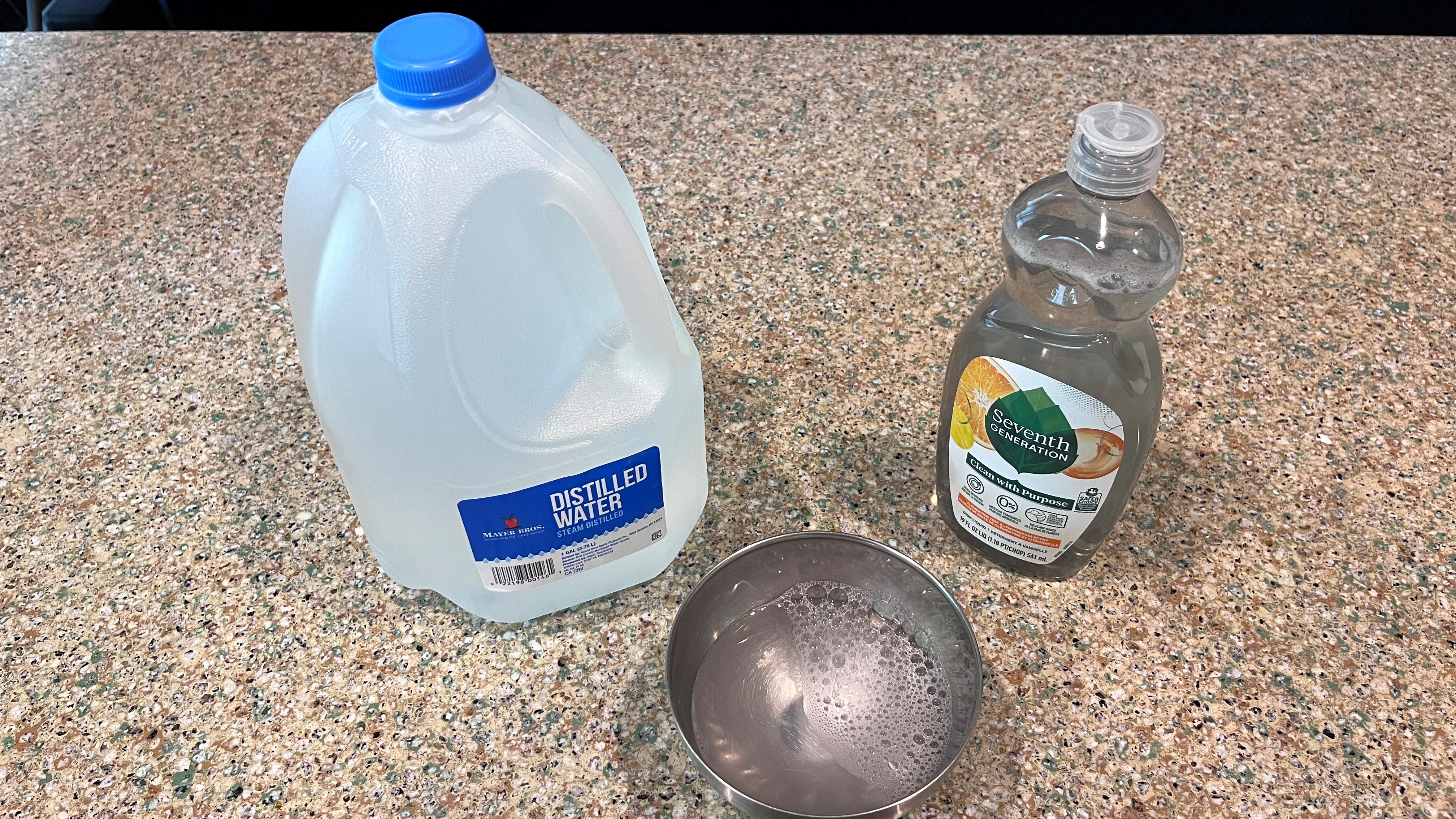
You may need a mild soap solution for tough stains like food splatter or heavy hand lotion residue. This method should be a last resort for specific spots only.
Mix a Mild Soap Solution
Combine one cup of distilled water with just one or two drops of mild dish soap. Panasonic recommends a ratio of 100 parts water to 1 part soap to avoid leaving a film.
Spot Clean Affected Areas
Apply the soapy mixture to your cloth and gently rub only the dirty spot. Do not soak the panel or spread the solution over the entire screen surface.
Rinse and Dry Thoroughly
Wipe the area again with a cloth dampened with plain distilled water to remove soap traces. Buff the spot dry immediately with a clean cloth to prevent residue buildup.
Sanitize Your Remote Control Safely
Your remote control collects more germs and debris than the screen itself, so it needs regular cleaning too. Proper care prevents button sticking and keeps your hands hygienic.
Remove Batteries First
Take out the batteries before you start to prevent corrosion or short circuits. This simple step protects the internal electronics from accidental moisture exposure.
Dislodge Debris Between Buttons
Turn the remote upside down and tap it gently against your palm to loose crumbs. Use a dry toothbrush or toothpick to clear out stuck particles between keys.
Wipe with Diluted Alcohol
Dampen a cloth with a mix of water and a tiny amount of alcohol to sanitize the plastic surface. Alcohol is safe for remote buttons but must never touch the TV screen.
Dry Completely Before Use
Wipe the remote with a dry cloth and let it air dry for five minutes. Reinsert the batteries only when the device is completely moisture-free.
Maintain Your Cleaning Supplies Properly
Dirty or damaged cleaning tools can scratch your screen or leave new smudges behind. Proper care of your cloths ensures they remain effective for years.
Wash Cloths Without Softener
Launder your microfiber cloths using only plain detergent in cold or warm water. Avoid fabric softener and dryer sheets because they leave a waxy residue that ruins the cloth.
Air Dry Only
Hang your cloths to dry naturally instead of using a clothes dryer. Heat damages the microfiber structure and reduces its ability to trap dust effectively.
Replace Worn Out Cloths
Throw away any cloth that feels stiff, frayed, or leaves lint behind. Old cloths lose their static resistance and can scratch your screen instead of cleaning it.
Avoid These Common Cleaning Mistakes
Even well-meaning users often make errors that cause permanent damage to their expensive displays. Knowing what not to do is just as important as knowing the right steps.
Do Not Use Paper Towels
Paper products feel soft but act like sandpaper under magnification. They create micro-scratches that scatter light and permanently reduce image clarity.
Never Spray Liquid Directly
Spraying water or cleaner directly on the screen risks liquid seeping into the bezel. This can cause electrical failure or ruin the internal components instantly.
Skip Standard Glass Cleaners
Most glass cleaners contain ammonia which destroys anti-reflective coatings. Even glass-front OLED models require gentle care to avoid clouding and degradation.
Avoid Excessive Pressure
Pressing too hard can crush individual pixels on LCD and OLED screens. Always use a feather-light touch to avoid creating dead spots or discoloration.
Adjust Cleaning by Screen Technology
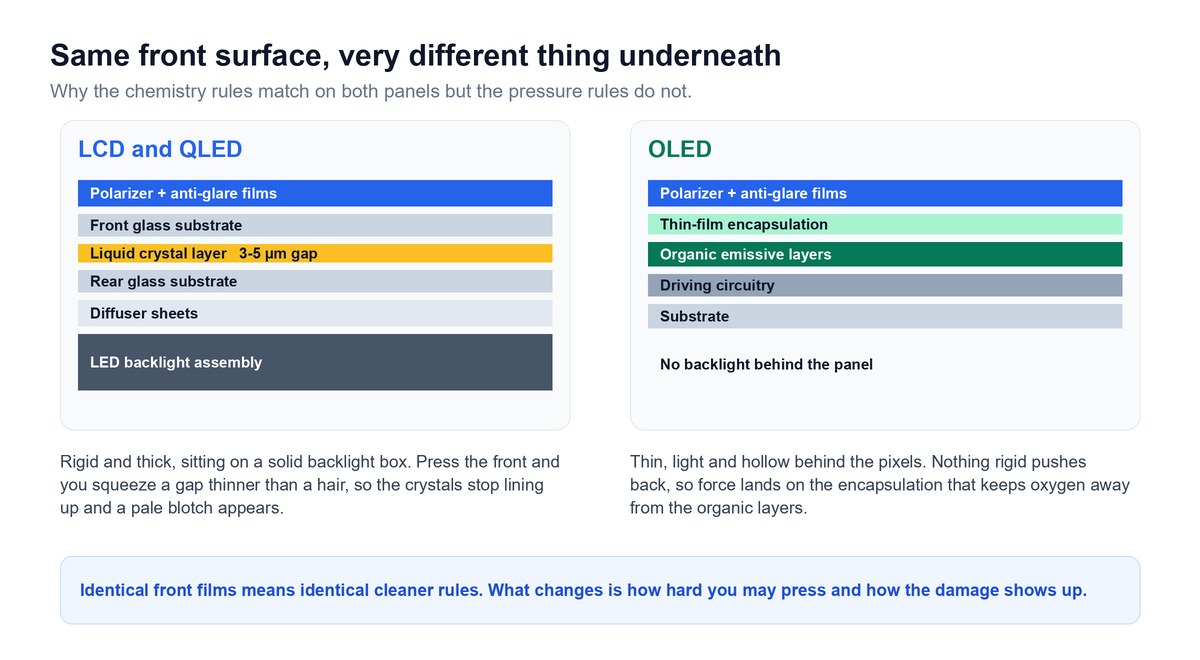
Different screen types have unique vulnerabilities that require specific care approaches. Understanding your display type helps you avoid costly mistakes.
OLED Screens Need Extra Care
OLED panels have delicate organic layers that react badly to harsh chemicals. Stick to dry dusting or damp wiping with distilled water only for these displays.
LCD Screens Are Pressure Sensitive
LCD and LED screens are less chemically sensitive but easily damaged by force. Avoid aggressive rubbing to prevent crushing the liquid crystal cells.
Glass Fronts Still Need Protection
Do not assume a glass front means you can use standard glass cleaner. Protective coatings on these screens are still vulnerable to ammonia and abrasives.
Establish a Regular Cleaning Schedule
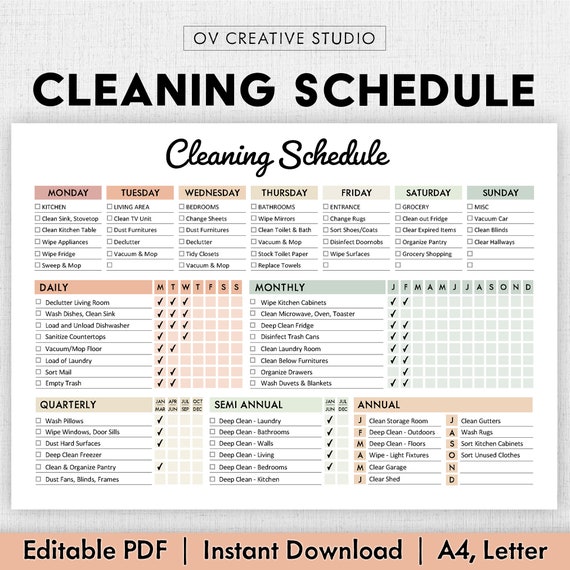
Consistent maintenance prevents heavy buildup and keeps your picture looking sharp year after year. A good routine saves time and reduces the need for deep cleaning.
Dust Every Few Weeks
Wipe your screen with a dry cloth every two to four weeks under normal conditions. This prevents dust from accumulating and becoming difficult to remove later.
Increase Frequency for Dusty Homes
Clean every two to three weeks if you have pets or live in a dry climate. High-dust environments require more frequent attention to maintain image quality.
Spot Clean After Events
Wipe away fingerprints or grease spots immediately after parties or cooking sessions. Prompt removal prevents residue from hardening and becoming harder to clean.
Frequently Asked Questions About Cleaning Flat Screen TVs
Can I use Windex on my flat screen TV?
No, you should never use Windex or any ammonia-based cleaner on a flat screen. Ammonia strips away the delicate anti-reflective coatings and can cause permanent clouding.
What is the best cloth to clean a TV screen?
A soft, lint-free microfiber cloth is the best choice for cleaning TV screens. These cloths trap dust without scratching and reduce static buildup effectively.
How often should I clean my television screen?
You should dry dust your screen every two to four weeks and damp clean only when necessary. Increase frequency if you live in a dusty environment or have pets.
Is distilled water necessary for cleaning TVs?
Yes, distilled water is necessary because tap water contains minerals that leave spots. These mineral deposits can etch the screen and ruin the picture quality over time.
Can I use alcohol wipes on my TV screen?
No, alcohol wipes can degrade screen layers and strip protective coatings. Alcohol is only safe for cleaning plastic remote controls, not the display panel itself.
Key Takeaways for How to Clean Flat Screen TV Monitor
Cleaning your television requires patience and the right materials to avoid permanent damage. Always unplug your TV, use only microfiber cloths with distilled water, and apply gentle pressure.
Avoid harsh chemicals like ammonia and never spray liquid directly on the screen. By following these simple steps, you will keep your display crisp and clear for years to come.