You’re looking at one right now, whether it’s your laptop, desktop, or smartphone. But have you ever wondered how an LCD monitor works to create every pixel, color, and gradient you see? Behind that flat glass panel sits a layered system of crystals, filters, and light sources working in perfect sync.
An LCD (Liquid Crystal Display) doesn’t generate its own light. Instead, it controls how much light passes through millions of tiny cells filled with liquid crystals, which are molecules that behave like both solids and liquids. By manipulating these molecules with electricity, the screen decides which pixels stay bright, which turn dark, and how colors combine. In this guide, you’ll learn the physics, the structure, and the practical differences between panel types so you can understand exactly what’s happening inside the glass.
The Unique Nature of Liquid Crystals
Liquid crystals exist in a strange state of matter that sits between solid and liquid. Unlike true solids with fixed molecular positions, or liquids with randomly moving molecules, liquid crystals maintain a specific orientation while still flowing into different positions. Most liquid crystal molecules used in displays are rod-shaped and fall into the nematic phase, where molecules share a definite order or pattern.
Temperature Sensitivity in LCD Technology
Liquid crystals respond dramatically to temperature changes. It takes significant heat to melt a solid into a liquid crystal state, but only a small temperature increase to push it into a true liquid. This narrow operating window is why LCDs work in thermometers and mood rings, and why laptop screens may behave sluggishly in extreme cold or heat. The molecular alignment required for image formation breaks down outside the ideal temperature range.
A Brief History of LCD Development
The story of liquid crystals began in 1888, when Austrian botanist Friedrich Reinitzer observed that cholesteryl benzoate turned cloudy when melted and cleared with further heating. Practical applications took decades to develop. In 1968, RCA created the first experimental LCD. By 1970, American inventor J. Fergason built the first working liquid crystal display that solved early problems with energy use and contrast. The first commercial LCD monitor arrived in 1971, initially limited to calculators and watches before evolving into today’s high-resolution screens.
The Four Physical Principles Behind LCD Operation
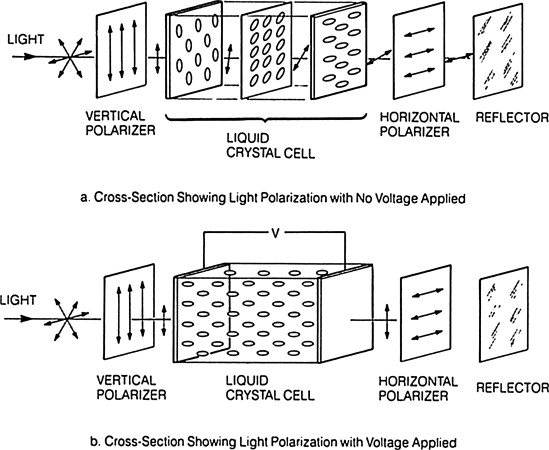
Understanding how an LCD monitor works requires grasping four key physical phenomena that work together. Without all four, the display simply cannot function.
Polarization and Light Filtering
Light waves normally vibrate in multiple directions. A polarizing filter blocks all light except waves oscillating in a single plane. This filtering is the first step in controlling what reaches your eyes.
Twisting Capability of Liquid Crystals
Liquid crystals naturally rotate the plane of polarized light as it passes through them. This twisting property is what makes the entire technology possible.
Electrical Control of Crystal Alignment
When voltage is applied to liquid crystals, their molecular arrangement changes. The degree of twist can be precisely controlled by adjusting the voltage level.
Blocking Mechanism with Perpendicular Filters
Two polarizing filters set at 90 degrees to each other block all light completely. This blocking action is what creates dark pixels on your screen.
How LCD Monitors Manipulate Light Step by Step

The actual process of creating an image follows a precise sequence. Here’s the step-by-step breakdown of how an LCD monitor works to produce every pixel you see.
The Default Bright State
- The backlight generates white light using LEDs or older CCFL tubes.
- This light hits the first polarizing filter, which aligns all waves to one direction.
- Liquid crystal molecules, guided by microscopic grooves on the glass, form a twisted structure (typically 90 degrees).
- As polarized light travels through this twisted layer, its polarization rotates by 90 degrees.
- The rotated light now matches the second polarizing filter’s orientation and passes through.
- The pixel appears bright.
The Activated Dark State
- Voltage is applied through transparent electrodes made of Indium Tin Oxide (ITO).
- The liquid crystal molecules untwist and align parallel to the electric field.
- Light passes through the liquid crystal layer without any rotation.
- When it reaches the second polarizing filter (perpendicular to the first), the light gets blocked.
- The pixel turns dark.
Creating Grayscale Through Variable Voltage
Pure black and white aren’t enough for realistic images. By varying the voltage applied to each pixel, liquid crystals twist only partially. This allows a specific percentage of light through, creating shades of gray. Modern displays typically control 256 brightness levels per sub-pixel for smooth gradients.
Inside the LCD Sandwich: Layer-by-Layer Construction

An LCD panel is a precision-built stack of materials, often called a “sandwich.” Each layer serves a specific purpose in the image-creation process.
The Component Stack from Back to Front
- Backlight unit – LEDs or CCFLs generate the light source.
- Diffuser panel – A white sheet that scatters light evenly to prevent hot spots.
- Rear polarizing filter – Aligns incoming light waves to a single direction.
- Rear glass substrate – Sodium-free glass with a transparent ITO electrode and alignment grooves.
- Liquid crystal layer – A thin film approximately 10–20 micrometers thick.
- Front glass substrate – Contains pixel electrodes and opposing alignment grooves.
- Color filter layer – Red, green, and blue filters aligned with sub-pixels.
- Front polarizing filter – Set perpendicular to the rear filter to block or transmit light.
- Protective outer layer – Glass or plastic cover, sometimes touch-sensitive.
Why Alignment Grooves Matter
Microscopic grooves on the glass substrates guide the liquid crystal molecules into their twisted configuration. These grooves are rubbed in opposite directions, usually 90 degrees apart, forcing the crystals to form a helical path. Without this alignment, the polarization twist wouldn’t happen, and the screen couldn’t control light properly.
Passive vs. Active Matrix: How Pixels Get Their Signal
The method used to charge individual pixels determines image quality, speed, and clarity. This addressing architecture is a critical part of how an LCD monitor works.
Passive-Matrix Limitations
Passive-matrix LCDs use a simple grid of rows and columns. To activate a pixel, voltage travels down a specific column while the corresponding row is grounded. The intersection lights up. However, this system has serious flaws:
- Slow response time causes ghosting during motion
- Crosstalk occurs when nearby pixels receive partial signals, creating blurry text
- Low contrast results from imprecise voltage control
This technology was common in early calculators and watches but is now obsolete for quality displays.
Active-Matrix (TFT) Precision Control
Modern screens use Thin Film Transistors (TFT), with one transistor dedicated to each sub-pixel. The active-matrix design enables:
- Exact voltage delivery to each pixel individually
- Capacitor storage that holds charge until the next refresh cycle
- Faster response times with no ghosting, even during fast video
A standard 1,024 × 768 display contains over 2.3 million transistors (1,024 × 768 × 3 sub-pixels). A single failed transistor creates a dead or stuck pixel, appearing as a tiny red, green, blue, or black dot that never changes.
RGB Color Mixing: How 16.8 Million Colors Are Made
You see millions of colors on screen, but the display only uses three. This additive color mixing system is fundamental to how an LCD monitor works.
Sub-Pixel Structure
Each logical pixel divides into three sub-pixels: red, green, and blue. Each sub-pixel has its own transistor and color filter. By adjusting the brightness of each sub-pixel independently, the monitor creates any color through additive mixing. For example:
- Full red plus full green produces yellow
- Red plus blue produces magenta
- All three at full intensity produce white
- All three off produces black
Understanding 8-Bit Color Depth
Most LCDs offer 256 shades of red, 256 shades of green, and 256 shades of blue. The total combinations equal approximately 16.8 million colors (256 × 256 × 256). This 8-bit color depth covers the full sRGB spectrum, enough for photos, videos, and everyday use. High-end professional monitors use 10-bit panels capable of over 1 billion colors for advanced editing work.
TN vs. VA vs. IPS: Choosing the Right Panel Type
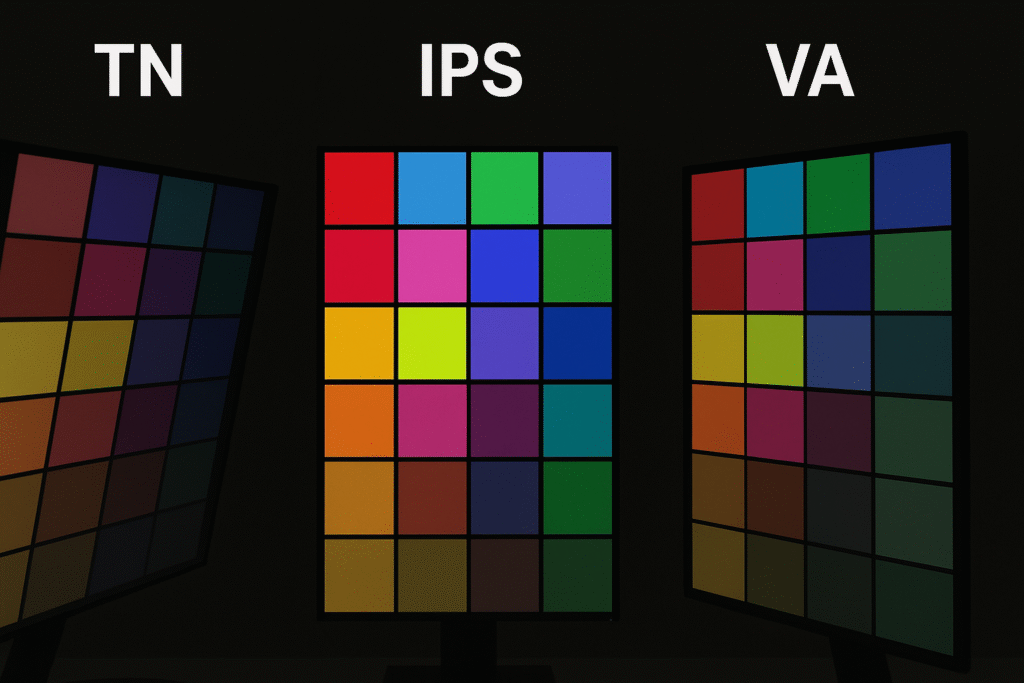
Not all LCDs perform the same way. The arrangement of liquid crystal molecules defines the panel type and dramatically affects your viewing experience.
Twisted Nematic (TN) Panels
TN panels use crystals that twist 90 degrees when off and untwist when voltage is applied. They offer the fastest response times (around 1ms gray-to-gray) and the lowest cost, making them popular for competitive gaming. However, they suffer from narrow viewing angles where colors shift off-center and poor color accuracy compared to other types.
Vertical Alignment (VA) Panels
VA panels arrange crystals perpendicular to the glass surface when off and tilt them when powered. They deliver superior contrast ratios (often 3000:1 or higher) with deep blacks, making them excellent for movies and dark-room viewing. The trade-off is slower response times (potentially 4–8ms) that can cause motion blur, plus moderate viewing angles.
In-Plane Switching (IPS) Panels
IPS panels keep crystals parallel to the glass substrates and rotate them horizontally with voltage. They provide the widest viewing angles (up to 178 degrees) with minimal color shift and excellent color accuracy. Modern IPS panels offer fast response times, though slightly slower than TN. Higher manufacturing costs make them more expensive, but they’re now standard in premium laptops and professional monitors.
Quick Comparison of Panel Types
| Feature | TN | VA | IPS |
|---|---|---|---|
| Viewing Angles | Narrow | Moderate | Wide |
| Color Accuracy | Fair | Good | Excellent |
| Contrast Ratio | Low | High | Medium |
| Response Time | Fastest | Moderate | Fast |
| Cost | Lowest | Medium | Highest |
Backlighting Systems: CCFL and LED Compared
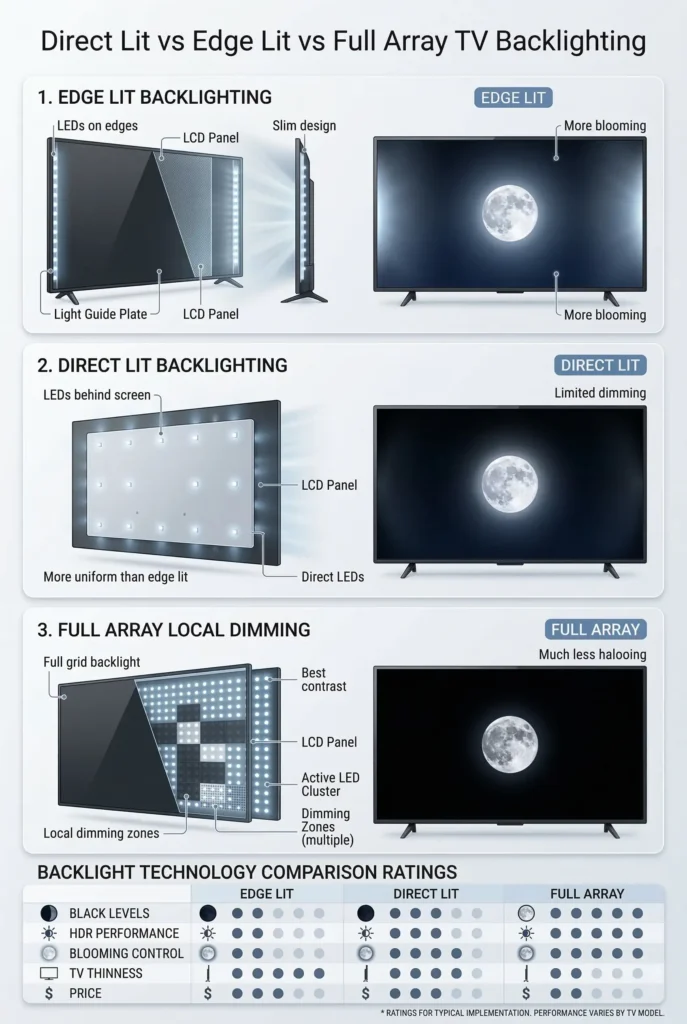
Since liquid crystals don’t emit light, the backlight is essential. Understanding the backlight helps explain how an LCD monitor works in practice.
CCFL vs. LED Light Sources
CCFL (Cold Cathode Fluorescent Lamps) represent older technology. These fluorescent tubes provide even lighting but consume more power, contain mercury, and require thicker panel designs. LED (Light Emitting Diodes) backlights are the modern standard, offering better energy efficiency, longer lifespan, slimmer form factors, and improved color reproduction. All current LCD monitors use LED backlights.
Edge-Lit vs. Full-Array Configurations
Edge-lit designs place LEDs around the screen perimeter and use a light guide plate to distribute illumination. This enables ultra-thin displays but can cause backlight bleed in corners. Full-array designs position LEDs directly behind the panel, enabling local dimming where specific zones turn off in dark scenes for deeper blacks. High-end monitors and TVs use full-array backlighting for superior contrast.
Why LCD Monitors Lose Light and Energy
Despite producing bright images, LCDs are inherently inefficient. More than 50% of the backlight gets absorbed during transmission due to:
- Polarizing filters that block half the light immediately
- Color filters that block two-thirds of light per sub-pixel
- Electrodes and the liquid crystal layer itself
To compensate, backlights must be powerful, which increases power consumption and heat generation. This inefficiency is why OLED displays, which emit their own light, can achieve perfect blacks and better battery life in portable devices.
Manufacturing Defects and Common Screen Problems
Producing large, flawless LCD panels is technically demanding. As display size increases, the probability of defects rises significantly.
High Rejection Rates in Production
Manufacturers may reject approximately 40% of produced panels during quality control due to dead pixels, dust contamination, or uneven backlighting. These rejected units drive up costs for consumers, especially for large 4K or 8K displays.
Bad Pixels Explained
Even accepted panels may contain a few defective pixels. A dead pixel stays permanently black because no light passes through. A stuck pixel stays permanently red, green, or blue because one sub-pixel remains activated. Most manufacturers allow 1–5 defective pixels before honoring warranty claims, reflecting the difficulty of perfect manufacturing.
Key Performance Specs That Define Monitor Quality

When evaluating an LCD monitor, focus on these critical metrics to understand how an LCD monitor works at peak performance.
Response Time
Measured in milliseconds (gray-to-gray), this indicates how fast a pixel changes state. Below 5ms works well for gaming, while 1ms is typical of TN panels. VA panels often range from 4–8ms and may show motion blur during fast action.
Contrast Ratio
This ratio between brightest white and darkest black varies by panel type. VA panels lead with 3000:1 or higher, while IPS and TN typically range from 1000:1 to 1500:1.
Viewing Angle
Measured where contrast drops to 10:1, viewing angle determines how far you can move from center before colors degrade. IPS maintains fidelity up to 178 degrees, while TN may degrade significantly beyond 160 degrees.
Color Gamut Coverage
This measures the percentage of standard color spaces the display can reproduce. IPS panels typically cover 95–100% of sRGB, while professional monitors target wider gamuts like AdobeRGB or DCI-P3 for creative work.
Caring for Your LCD Monitor: Lifespan and Cleaning Tips
LCDs are durable but benefit from proper care to maximize their operational life.
Expected Lifespan
LED-backlit LCDs typically last 30,000 to 60,000 hours before the backlight dims to 50% brightness. At 8 hours of daily use, that translates to 10–20 years of service.
Burn-In vs. Image Retention
Unlike OLED displays, LCDs don’t suffer permanent burn-in. However, image retention (temporary ghosting) can occur when static images display for extended periods. This ghosting fades over time once the display shows different content.
Safe Cleaning Methods
Use a soft, dry microfiber cloth to clean your screen. Avoid ammonia-based cleaners that damage polarizing filters. Never press hard during cleaning, as pressure can misalign liquid crystals and cause permanent distortion.
Frequently Asked Questions About LCD Monitors
What is the difference between LCD and LED monitors?
LED monitors are actually a type of LCD. The “LED” label refers to the backlight technology, while “LCD” describes the liquid crystal display panel itself. All modern LCD monitors use LED backlights instead of older CCFL tubes.
Why do LCD monitors lose more than half their backlight?
Polarizing filters absorb roughly half the light immediately. Color filters then block two-thirds of remaining light per sub-pixel. Combined with absorption by electrodes and the liquid crystal layer, over 50% of generated light never reaches your eyes.
What causes dead pixels on an LCD screen?
Dead pixels result from failed transistors in the TFT array. Each sub-pixel has its own transistor, and when one malfunctions, that sub-pixel stops responding. Manufacturing defects, physical pressure, or age-related component failure can all cause this issue.
How long does an LCD monitor typically last?
LED-backlit LCD monitors last approximately 30,000 to 60,000 hours before backlight brightness diminishes to 50%. With 8 hours of daily use, most monitors provide 10–20 years of service before requiring replacement.
Can LCD screens suffer from burn-in?
No, LCD screens don’t develop permanent burn-in like OLED displays. They can experience temporary image retention when static content displays for hours, but this ghosting fades once normal content resumes.
What should I do if my LCD screen goes dark?
Shine a flashlight close to the screen. If you can faintly see the image, the backlight has failed. The LEDs or inverter likely need professional repair or replacement. If no image appears even with a flashlight, the panel itself may be damaged.
Key Takeaways for Understanding LCD Monitor Technology
Grasping how an LCD monitor works reveals the elegant physics behind everyday screens. Liquid crystals twist polarized light when voltage is absent and let it pass straight through when voltage straightens them. Two perpendicular polarizing filters then either transmit or block that light, creating bright or dark pixels. RGB sub-pixels combine at varying intensities to produce over 16.8 million colors.
When choosing a monitor, match the panel type to your needs: TN for competitive gaming speed, VA for deep contrast in dark rooms, and IPS for color accuracy in creative work. If your screen ever darkens, shows stuck pixels, or develops backlight bleed, you now understand the likely cause and whether repair makes sense. This knowledge helps you make smarter purchasing decisions and troubleshoot problems with confidence.